

Campaign footage often becomes outdated before it becomes unusable. A strong product shot may have last season’s background, an old visual mood or one distracting object that no longer fits the message. Rebuilding the entire asset wastes approved work and slows testing.
This guide shows marketing teams how to identify clips worth refreshing, make focused AI edits and protect the product, claim and brand details that must remain accurate.
Why Do Marketing Teams Refresh Campaign Videos with AI Editing?
Marketing teams use AI editing when the core footage is still correct but its setting, atmosphere or presentation no longer fits the campaign. A focused edit can preserve approved performances and product details while creating a useful new variation.
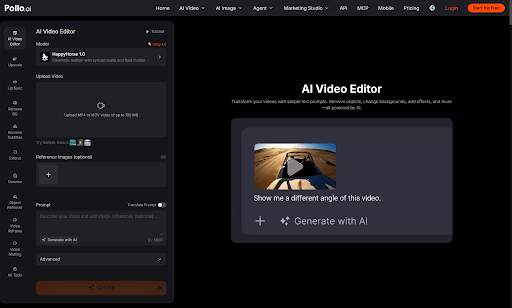
Teams can refresh campaign video with AI editing by uploading an existing clip and describing one visual change in plain language. Pollo AI lists prompt-based controls for background replacement, object removal, weather and atmosphere changes, subject appearance, effects and camera views.
Those controls are most valuable when the marketing claim and main action are already right. They should not be used to invent a product feature, customer result or event that the source never showed.
At the time of writing, the online editor accepts MP4 or MOV files up to 100 MB, supports up to five optional reference images and provides up to 5,000 characters for the prompt. These specifications suit short campaign clips, although teams should confirm the current interface before planning a large production batch.
What Is a Repeatable AI Video Editing Workflow for Campaign Refreshes?
Start from an approved master, define one reason for the refresh and change only the visual layer that blocks the new message. Use the following workflow for each campaign variation.
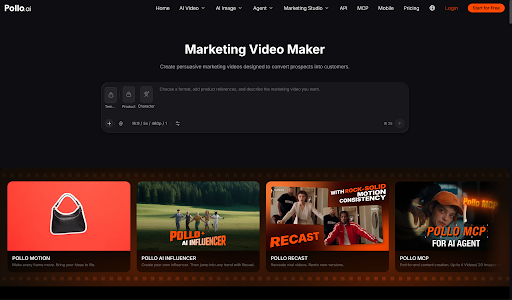
- Confirm the new campaign job. Decide whether the asset needs a new offer, audience, season or platform angle. If the team still needs an original concept, first build a marketing video draft from the approved brief, then use editing for specific visual corrections rather than asking one clip to serve several unrelated ideas.

- Choose an approved source clip. Use footage with the correct product, presenter, action and claim. Editing a visually attractive but inaccurate source only makes the error harder to notice.
- Write one change request. Name the target and desired result, such as replacing a summer background with a restrained winter setting. State which subject, package, logo and framing details must remain unchanged.
- Generate a low-risk first variation. Begin with background, atmosphere or object cleanup. Review that result before adding stronger effects or changing the camera view.
- Compare against the approved master. Check product geometry, colour, labels, hands, faces, shadows and the area around the edit. A campaign refresh fails if it weakens factual accuracy.
- Finish copy in an editable layer. Add prices, dates, captions and legal wording after the visual edit so the team can update text without regenerating the scene.
- Name and archive the variation. Record the source, prompt, audience and campaign purpose. Clear version names prevent an experimental edit from replacing the approved master.
Which Campaign Problems Are Good Candidates for AI Video Editing?
Background, atmosphere and local distraction problems are usually better candidates than incorrect products, claims or performances. Use a simple edit-or-rebuild decision before spending credits or review time.
| Campaign problem | Recommended action | Approval check |
| Outdated seasonal setting | Edit background or atmosphere | Product and offer remain accurate |
| Distracting prop | Remove the specific object | Edges and shadows remain stable |
| Mood does not fit the channel | Adjust light, weather or colour | Brand palette still feels recognisable |
| Wrong product or packaging | Replace or reshoot the source | Current item is shown truthfully |
| Presenter says the wrong claim | Record or generate a new performance | Spoken and written claims match |
How Do Marketing Teams Keep Refreshed Creative Consistent?
Approve one visual rule set and one reference version before creating the full campaign batch. Consistency comes from repeatable review, not from adding the word cinematic to every prompt.
Define the background family, light direction, colour temperature, effect intensity and protected brand details. Test those rules on one representative clip, then use the accepted prompt structure for the remaining assets.
Review every version on the device where it will run because a subtle edge problem on desktop may become obvious in a vertical social crop. Keep generated visuals separate from editable campaign copy so a date or price change never forces another visual transformation.
When Should a Campaign Team Avoid Editing the Existing Video?
Start over when the source contains the wrong evidence, misses the required action or cannot support the new audience promise. AI editing improves presentation, but it should not manufacture proof.
Use a new source for changed packaging, unavailable features, inaccurate demonstrations, expired endorsements or a performance that no longer matches the script. The same rule applies when heavy blur or obstruction hides the product details reviewers need to verify.
A replacement clip may take longer initially, but it is safer than stacking attractive edits over footage that cannot pass factual approval.
Ready to Refresh Campaign Creative with Pollo AI?
Choose one approved clip with one visible presentation problem and create a controlled variation. Upload it to Pollo AI Video Editor, describe the change and protect the product, presenter and brand details that matter. Compare the result with the master before building the rest of the campaign.
A disciplined first edit gives the team a reusable process instead of another collection of disconnected experiments.
